Send and Receive Email with Ploy
Send transactional email from workers, receive messages in an email() handler, and let Ploy Auth handle verification, sign-in links and codes, and password resets. Private receive-only inboxes work without sending approval.
Sending a receipt, processing an incoming invoice or emailing a sign-in code used to mean wiring another provider into your app. Ploy Email brings sending, receiving and Auth emails into the platform, with shared domain setup and delivery controls.
Set up your organization
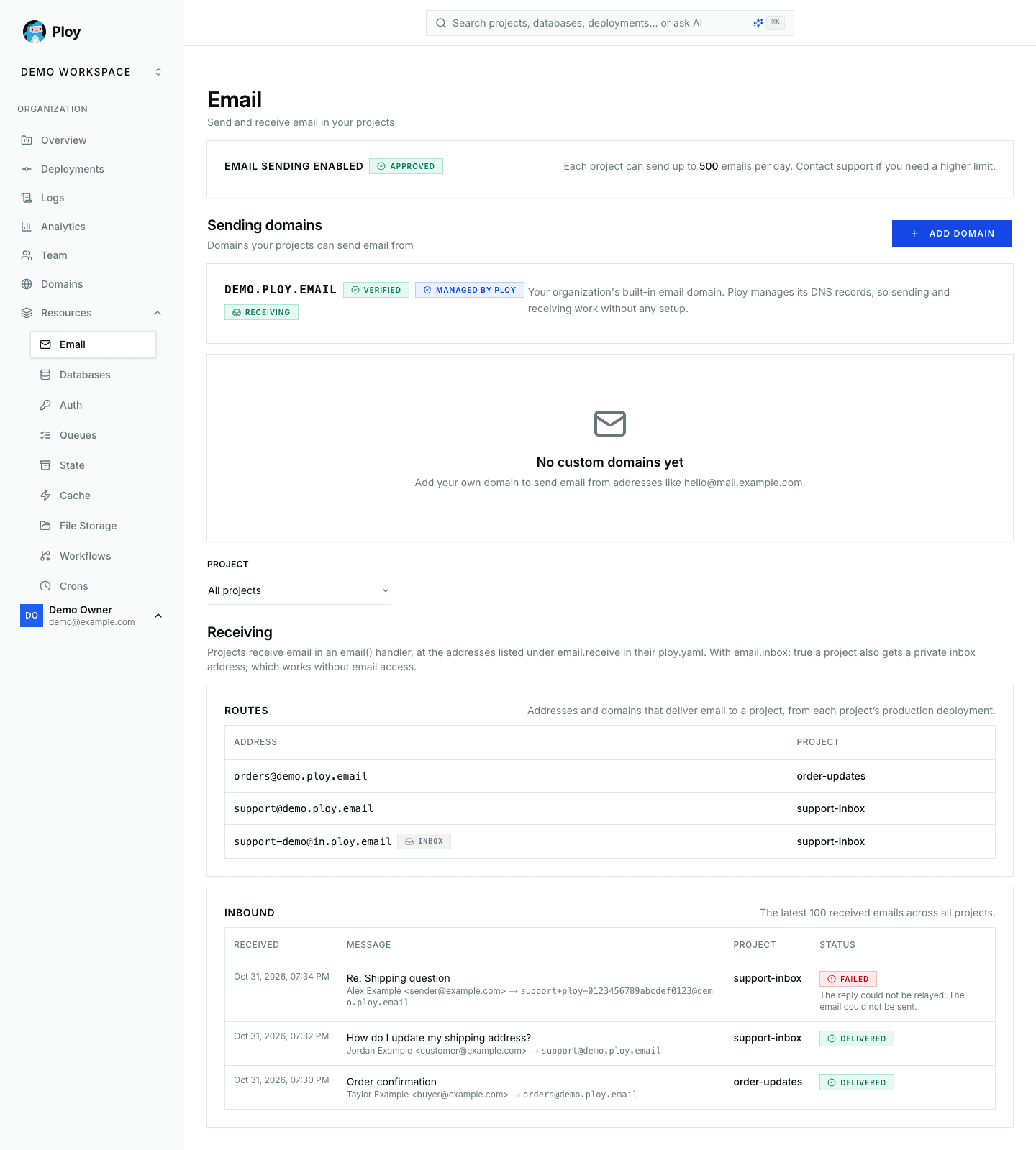
Open Dashboard → Resources → Email and describe what your projects will send. Sending requires a manual review, on every plan. Once approved, your organization gets a <name>.ploy.email domain with no DNS setup. You can also verify a custom domain; Ploy adds its records automatically when it manages the DNS.
Each project has a daily sending limit, shown on the Email page and adjustable through support. Permanently bounced addresses and spam complaints are suppressed automatically, and high bounce or complaint rates can pause an organization's sending.
Send and receive from workers
Declare an email binding and the addresses your worker receives at in ploy.yaml:
email:binding: EMAILfrom: "Acme Support <support@acme.ploy.email>"allowed_from:- "*@acme.ploy.email"receive:- "support@acme.ploy.email"
email:binding: EMAILfrom: "Acme Support <support@acme.ploy.email>"allowed_from:- "*@acme.ploy.email"receive:- "support@acme.ploy.email"
Send transactional email with env.EMAIL.send(), and handle incoming messages in email():
export default {async fetch(request, env) {const { id } = await env.EMAIL.send({to: "jane@example.com",subject: "Your order has shipped",text: "Your order #1234 is on its way.",});return Response.json({ id });},async email(message) {await message.reply({ text: "Thanks, we received your message." });},} satisfies Ploy<Env>;
export default {async fetch(request, env) {const { id } = await env.EMAIL.send({to: "jane@example.com",subject: "Your order has shipped",text: "Your order #1234 is on its way.",});return Response.json({ id });},async email(message) {await message.reply({ text: "Thanks, we received your message." });},} satisfies Ploy<Env>;
Run ploy types to generate the binding's types. Sending supports text and HTML, Cc, Bcc and Reply-To. Incoming messages expose headers and the raw message, and can be replied to, forwarded or rejected. Exact addresses accept +tag variants, and whole-domain routes work too. Routes come from the production deployment and incoming email runs there, not in previews.
Your ploy.email domain receives without DNS setup. For a custom domain, enable Receive email and add the displayed MX record, or let Ploy DNS add it. Use a subdomain if your main domain already has mailboxes: changing its MX records would redirect that mail to Ploy.
To reply from your own mail app while keeping your personal address private, forward with message.forward("me@example.com", undefined, { relayReplies: true }). Authenticated replies from that target are relayed back in the same thread from your project's receiving address.
Give an automation its own inbox
If your worker only needs to receive, it does not need sending approval or a domain:
email:inbox: true
email:inbox: true
Ploy assigns a private address at in.ploy.email and delivers its mail to email(). The address stays the same across deployments and appears in build logs and the Email page. Removing the setting releases it. These inboxes cannot reply or forward; those operations require a sending domain and approved access.
Configure Auth emails without app code
Under Dashboard → Resources → Auth, enable email and choose the sign-in methods, sender and templates for each project:
| Setting | What it does |
|---|---|
| Magic link | Sends a one-time sign-in link |
| Email code | Sends a six-digit sign-in code; enable both methods to include a link and code in one email |
| Require email verification | Blocks unverified password accounts from signing in until they verify their address |
| Sender | Uses your ploy.email domain or a verified custom domain, with your address and display name |
| Templates | Customizes each email's subject, heading, body and button label, with a live preview and test send |
Users can reset a forgotten password, or change or set one from their profile. Password changes send a notice. Hosted Auth pages and @meetploy/auth-react support these flows, including sign-in links and codes. Auth emails use the same sending approval and project limits as worker email.
Follow deliveries and test locally
Open Resources → Email inside a project to see its receiving routes and inbound delivery statuses, or filter by project on the organization's Email page. Delivery and reply-relay failures also appear as EmailDeliveryError entries in the production deployment's error logs. Temporary worker failures are retried, and verified organization owners and admins are notified of delivery failures, with alerts rate-limited per project. Hosted delivery also reports eligible permanent failures to the original sender, without replying to spam or automated mail.
Under ploy dev, no real email is sent. Worker sends, replies and forwards appear in the local dashboard's Email inbox; Send test email exercises your local email() handler. Auth messages appear under Auth → Emails, with links printed in the terminal.
Email is available on every plan; sending requires organization approval. Self-hosted instances can use their own SMTP server for sending.